Back to the building4Level 4 · Margaritas
Proposal · redesign concept

Margaritas Taqueria

A taqueria moved from a truck into its own restaurant. Its website was hidden from Google and had no menu, so I built the one I'd pitch them.

2.3×faster to load on a phone
85→100accessibility score
58→10files requested

Measured on the preview. Not launched yet.

My part
Audit, design and build
Year
2026
Built with
Custom WordPress theme, no plugins
Status
Proposal ready, not yet sent
Preview
margs.uncrwn.com
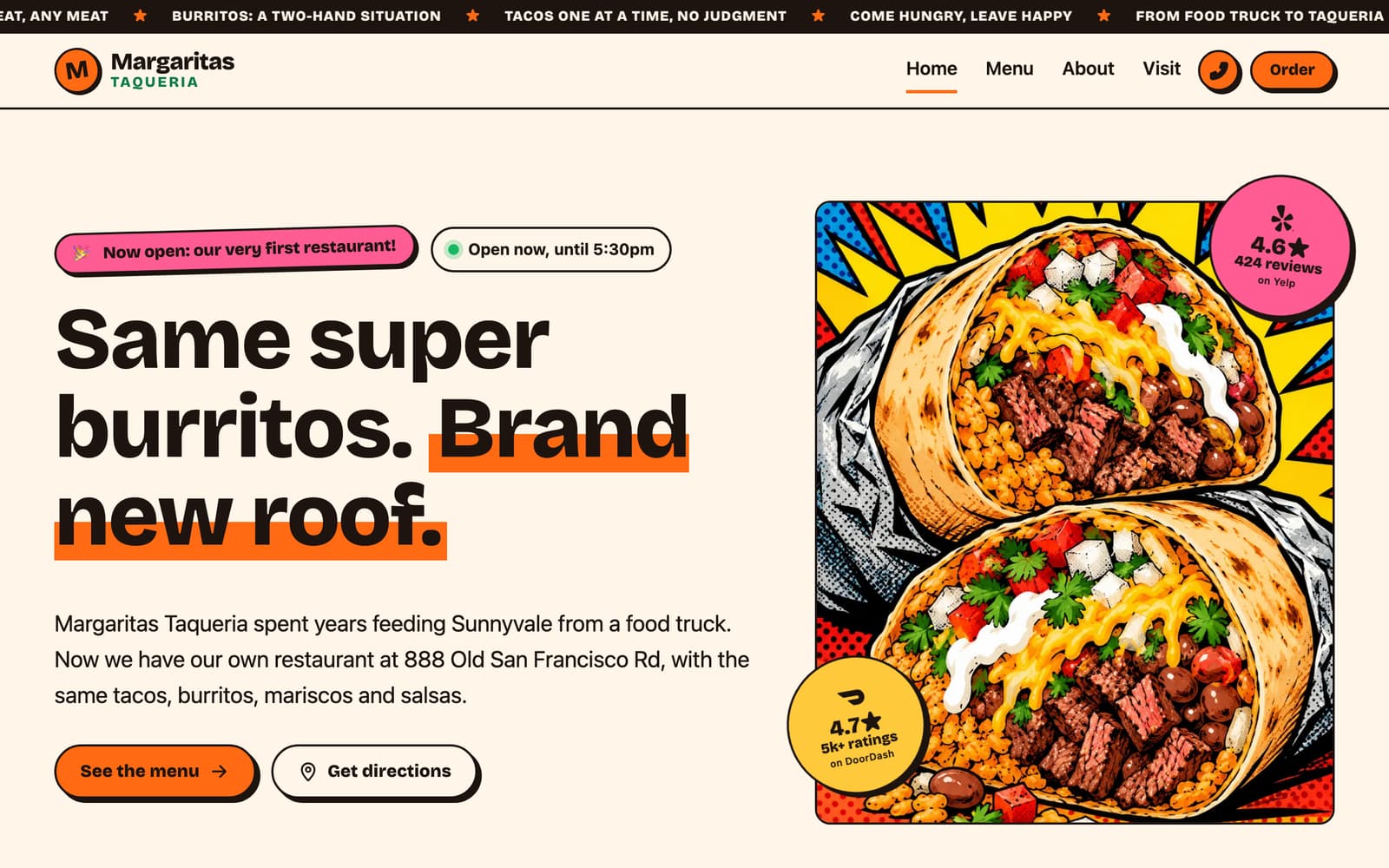
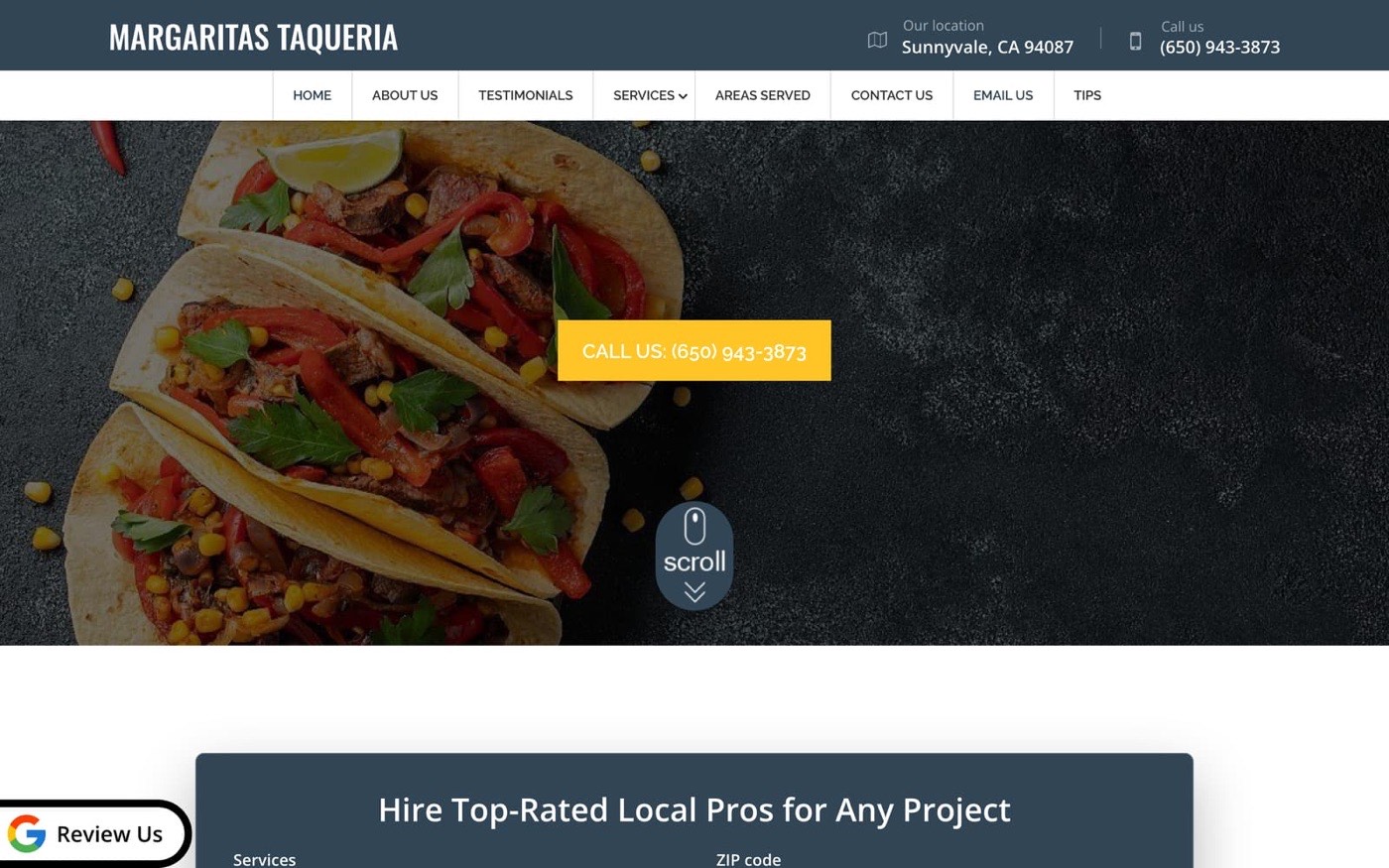
The proposed homepage: Now open banner, menu and directions up front The current website: a generic services template with no menu TodayProposed
Drag to compare. Left: the current site. Right: the concept.Same restaurant, same address.
I

The brief

Nobody asked for this one. I noticed the problem as a customer.

We've been going to Margaritas for years, since their truck in Sunnyvale. Then the truck moved closer to Santa Clara, near a hospital. When we looked them up again, they had their own restaurant, which is a huge step for a food truck. But online, the new place was hard to find.

Their website told Google not to list it, it was a template for a different kind of business, and the only menu online was on DoorDash. Some listings still sent people to the old truck spot.

My fiancée looked at their website and said I should help them. So instead of a pitch deck, I built the site, put it on a preview address, and wrote a short proposal around it.

II

The audit

What I found, and what the proposed site does about each one.

4red flags0fixed
  1. Google can't see it

    A noindex setting, usually left on by accident, tells search engines not to list the site.

    FixIndexing is tied to the real domain: it turns on there by itself, with a sitemap, while every preview copy stays hidden.

  2. Built for a different business

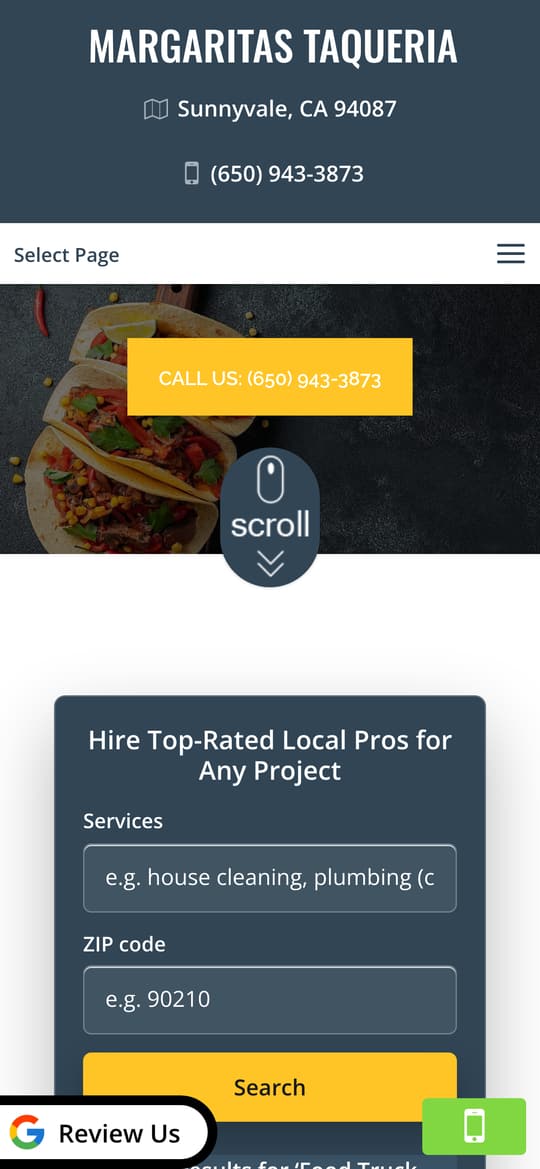
    Pages like "Services" and "Areas Served", and a box for hiring cleaners and plumbers. No food anywhere.

    FixFour pages built from scratch around the food and the story: Home, Menu, About and Visit.

  3. Listings don't agree

    Google still listed the old food truck address, and Google and Yelp disagreed on Friday closing time.

    FixOne config holds the address, phone and hours, and every page, the footer and the structured data read from it. Fixing the Google listing is part of launch.

  4. The menu only lived on DoorDash

    To see what they serve, customers had to go through a delivery app, at delivery-app prices.

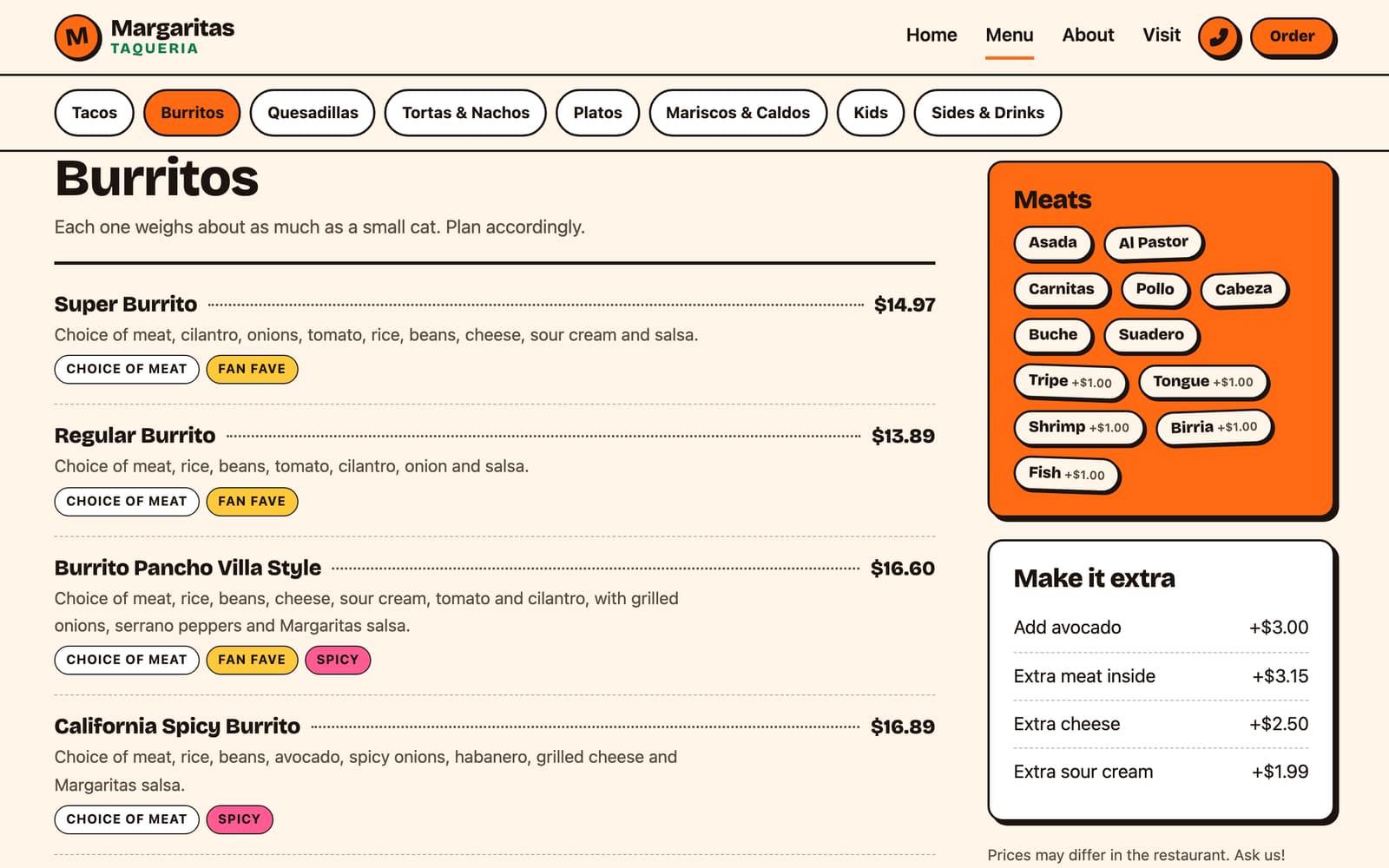
    FixThe full menu on its own page: 34 items in 8 sections, with meat choices, add-ons and labels like Fan fave, Spicy and Veggie.

III

The proposed site

Phone first, because that's where people decide where to eat.

The proposed menu page on desktop, with sections, prices and labels
The menu page: every item, price and label in one place.
The current site on a phone
Today
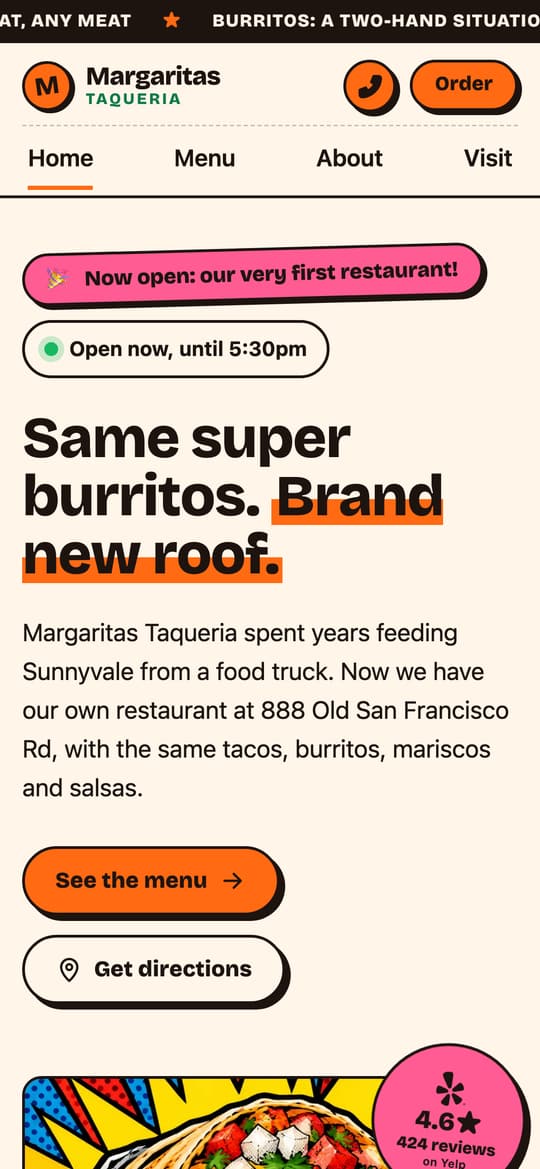
The proposed site on a phone: Now open banner, Open now badge, menu and directions buttons
Proposed
  • Tap to callThe phone number is one tap from every page.
  • Tap for directionsStraight to the new restaurant, not the old truck spot.
  • Open nowA live badge worked out from their hours.
  • Now openThe truck-to-taqueria story, right on the homepage.
  • Reviews up frontTheir Yelp and DoorDash ratings, with links out.
  • Easy to findGoogle and AI assistants can read the address, hours, menu and FAQ directly.
IV

The napkin plan

what a hungry person needs in the first five seconds
  1. 1can I call them?Call button in the header on every page, next to Order.
  2. 2is it the new place??A loud "Now open" banner, because regulars still knew the truck.
  3. 3are they open right nowA badge that answers it, worked out from their hours.
Phone screenshot of the proposed homepage with numbered notes 123456
Home, on a phone
  1. 4menu = one tapThe first button, not a link to a delivery app.
  2. 5then directionsSecond button, straight to the new address.
  3. 6proof it's goodTheir real review ratings, before anyone has to scroll far.
left out on purpose:page builderpluginsjQuerystock photos
V

The hard parts

The decisions that make a small restaurant site cheap to run and hard to break.

01

A theme with no plugins

Most restaurant sites stack a page builder and a dozen plugins, and each one is something to update and secure.

I wrote a custom WordPress theme that needs no plugins and no page builder. Each page is about 33KB of HTML, with one self-hosted font and no jQuery.

02

A menu the owners can edit

The menu had to go live with real data, then belong to the owners, not to me.

I scraped their DoorDash menu into a starting file that loads once on install. After that, every item is a normal entry in WordPress, with sections, labels and Quick Edit for prices.

03

"Open now" that stays true

A cached page would freeze the badge at whatever time it was saved.

The badge is worked out in the visitor's browser from the saved hours, so it stays correct even when the page itself is cached.

04

A preview that can't compete

A live preview of their site could end up in Google next to the real one.

Indexing only turns on for their real domain. The preview, staging and local copies all tell search engines to stay away, so moving it over is the only switch.

How I'd run it

They change it from their phone

No calling anyone to change a price. Log in, edit, and it's live when they save.

  • Change a price from the list with Quick Edit
  • Hide a sold-out dish and bring it back later
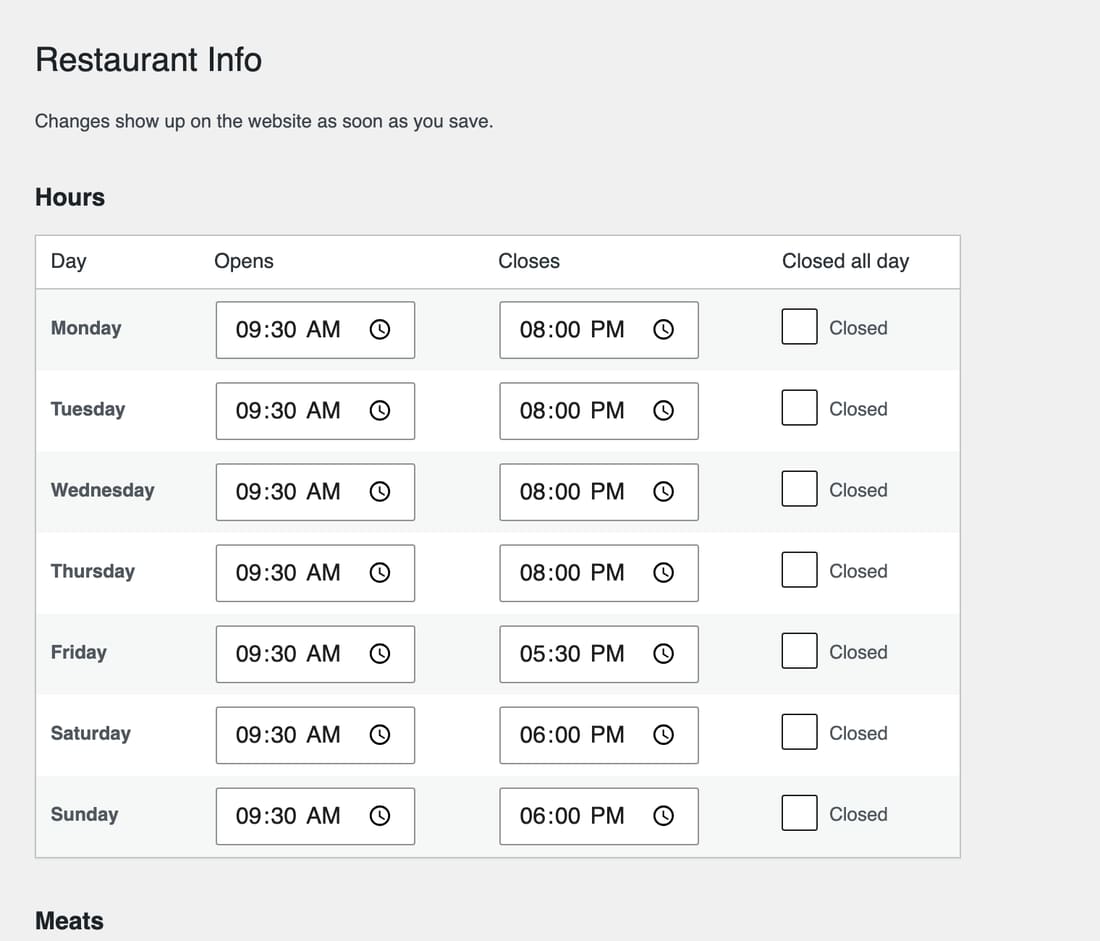
  • Set hours and closed days; the Open now badge follows
  • Update meats, add-ons and the scrolling banner
  • New pages and new photos are on me
The WordPress admin where owners edit menu items
VI

The stack

WordPressA login the owners already understand, with an Editor role so they can't break the theme.
Custom themeNo plugins or page builder; activating it creates the pages and imports the menu.
Structured dataRestaurant, Menu and FAQ markup plus an llms.txt, so search and AI tools read the facts directly.
CloudflareSSL and Cloudflare protection, with caching and daily backups from the host.
GitHub ActionsEvery push is syntax-checked, uploaded and the cache cleared, so changes are checked before they go live.
VII

Expected impact

Measured on the preview against their current site. Nothing here has launched yet.

2.3×faster to load the main content on a phone: 3.6 seconds instead of 8.4.
Tested on a phoneTodayProposed
Performance score6889
Accessibility score85100
Best practices score79100
First thing on screen2.7s1.7s
Data downloaded1,216 KB532 KB
Files requested5810
Listed in GoogleNoOnce on their domain

Google Lighthouse, simulated phone on a slow mobile connection, October 2, 2026, middle of three runs each. The new site's performance score ranged from 77 to 100 between runs.

Found in search

People searching for the restaurant would find its own site, not just third-party listings.

A menu outside the apps

Customers could see what they serve without opening a delivery app first.

Fewer wrong turns

One address and one set of hours on every listing.

VIII

Takeaways

What worked

Being regulars. We've followed them since the truck days, so this felt like helping friends, not a sales call. Building it before pitching it helped too: instead of mockups and a promise, the proposal could say "it's live, try it on your phone."

What I'd change

I'd talk to the owners sooner. The menu came from DoorDash, so prices, Friday hours and even the spelling of the name still need their sign-off before launch.

What's next

If they say yes, I move it to their domain, turn on indexing and point their Google listing at the restaurant. Then a 15-minute walkthrough of editing it from a phone.